


Client Portal Security: What Every Agency Needs to Know
Last updated: March 2026
Nobody starts an agency because they're excited about data encryption.
You started one because you're good at design, or development, or marketing. Security probably ranks somewhere between "update my LinkedIn" and "fix the office printer" on your priority list. I get it. I've been there.
But here's the problem: the moment you give a client access to a portal, you become responsible for their data. Their login credentials, project files, brand assets, billing information, internal strategy docs. All of it lives on servers you chose. And if something goes wrong, "I'm a creative agency, not an IT company" isn't going to fly with a client whose data got exposed.
This isn't about scaring you into buying enterprise software. It's about knowing enough to make smart choices and avoid the tools that leave obvious gaps. Most of this is simpler than you think. (If you're still evaluating portal tools in general, start with our complete guide to client portals for agencies.)
The actual risk (it's not theoretical)
The average data breach costs $4.45 million (IBM, 2025), and 55% of employees adopt SaaS tools without security review. For agencies, even a minor breach can destroy client trust overnight.
Let's talk numbers for a second.
The average cost of a data breach in 2025 hit $4.45 million (IBM Cost of a Data Breach Report). For cloud and SaaS environments specifically, that number jumps to $5.17 million. And on average, it takes 277 days to even identify and contain a breach. That's nine months of someone having access to your clients' data before you notice.
Now, nobody's saying your 8-person agency is going to eat a $4.45 million loss. But your clients read the same headlines you do. They know breaches happen. And when they're deciding between two agencies and one can clearly explain how their portal handles security, that agency wins.
Here's the scarier stat for small agencies: 55% of employees adopt SaaS tools without security team involvement (Cloud Security Alliance, 2025). That probably sounds familiar. Someone on your team signs up for a file-sharing tool, a PM app, or a cheap portal solution, and nobody checks whether it encrypts data or isolates client information. That's how gaps happen.
Compromised credentials account for 16% of breach incidents as an initial attack vector (IBM, 2025). Meaning someone reuses a password, gets phished, and suddenly an attacker is inside your portal. This is exactly why passwordless authentication matters (more on that below).
Essential security features (what to actually look for)
Every agency portal needs encryption (transit and at rest), passwordless or multi-factor authentication, per-client data isolation, audit logs, and PCI-compliant payment processing.
You don't need to become a security expert. But you do need to know what separates a secure client portal for marketing agencies from a tool that just looks secure on the marketing page.
Encryption (transit and at rest)
Two types matter:
In transit: Data is encrypted while it moves between your client's browser and the server. This is TLS (Transport Layer Security). If the portal uses HTTPS, it has this. Most modern tools do. If one doesn't, run. Data is encrypted while sitting on the server. This is typically AES-256 encryption. It means that even if someone accessed the physical server, the data would be unreadable without the encryption key. Both matter. A tool that encrypts data in transit but stores it unencrypted at rest is like locking your front door and leaving the garage wide open. Traditional portals make clients create an account with a username and password. You already know how this goes. They forget the password. They reuse one from another site. They email you asking for a reset link. Half your clients never log in at all because the friction is too high. Worse, shared passwords are a genuine security risk. If your client uses the same password for their portal login and their email, one breach compromises both. solves this entirely. The client enters their email, receives a unique code, and they're in. No password to forget, reuse, or steal. The code expires in minutes. There's nothing for an attacker to harvest from a phishing attempt because the credential doesn't persist. Sagely is currently the only agency portal using OTP (passwordless) authentication by default. It's one of the simplest security upgrades you can make, and it happens to solve the "my client won't log in" problem at the same time. is the next best option. It adds a second verification step on top of a password. Better than password-only, but still requires clients to manage that password in the first place. Client A should never, under any circumstances, see Client B's data. This sounds obvious. It is not always implemented well. Some portal tools are built on shared database architectures where isolation is handled at the application level rather than the infrastructure level. That's a fancier way of saying: the only thing separating your clients' data is the software's code, not the actual database structure. If there's a bug, data could leak between accounts. Ask your portal vendor directly: "How is client data isolated?" If they can't give you a clear answer, that tells you something. Audit logs record who accessed what and when. If a client claims they never received a file, or if you need to verify that only authorized people viewed a document, audit logs are how you prove it. They're also useful if something does go wrong. Security teams (or, more realistically for small agencies, you at 11pm) can trace exactly what happened and when. If your portal handles payments, it should use a PCI-compliant payment processor like Stripe. You should never be storing credit card numbers on your own servers (or your portal vendor's servers). Stripe handles that so you don't have to. Every portal on our comparison list uses Stripe for payment processing, which is the right call.At rest:
Authentication (this is where most portals fail)
OTP (one-time password) authentication
Two-factor authentication (2FA/MFA)
Data isolation
Audit logs
Payment security
Compliance standards (what they mean, whether you need them)
SOC 2, GDPR, CCPA, and data residency requirements sound complex, but most boil down to "store data securely, control access, and let people delete their data on request."
Compliance acronyms sound intimidating. Most of them boil down to: "We follow documented security practices and an auditor verified it."
SOC 2
SOC 2 (Service Organization Control 2) is an audit framework that verifies a company handles data securely. It covers five areas: security, availability, processing integrity, confidentiality, and privacy.
Do you need your portal vendor to be SOC 2 certified? If you work with enterprise clients, probably. If your clients are small to mid-size businesses and you're a 5-person agency, probably not. But it's a trust signal. It tells your client's IT team that your tools have been independently audited. If you have clients in the EU or handle data from EU citizens, GDPR applies to you. The relevant parts for portals: data must be stored securely, users must be able to request deletion, and you need to be clear about what data you collect and why. Most reputable portal tools handle GDPR basics. But you're still responsible for your own practices. Having a portal that's GDPR-compliant doesn't help if you're emailing client data in unencrypted attachments on the side. California's privacy law (CCPA) gives consumers the right to know what data is collected, request deletion, and opt out of data selling. If you serve California-based clients, this matters. Some clients (especially in regulated industries like healthcare or finance) require their data to be stored in a specific country or region. Ask your portal vendor where their servers are located. This rarely matters for a typical marketing agency, but if you land a client in a regulated industry, it could become a dealbreaker overnight. Here's how the major agency portal tools stack up on security features: Assembly (Copilot) is the clear leader on enterprise compliance (SOC 2, HIPAA). If you're working with healthcare or enterprise clients, that matters. Sagely takes a different approach: passwordless OTP authentication eliminates credential-based attacks entirely, which addresses the most common breach vector for small agency portals. ManyRequests and Wayfront cover the basics but don't specify MFA options clearly.GDPR
CCPA
Data residency
Security comparison: agency portal software
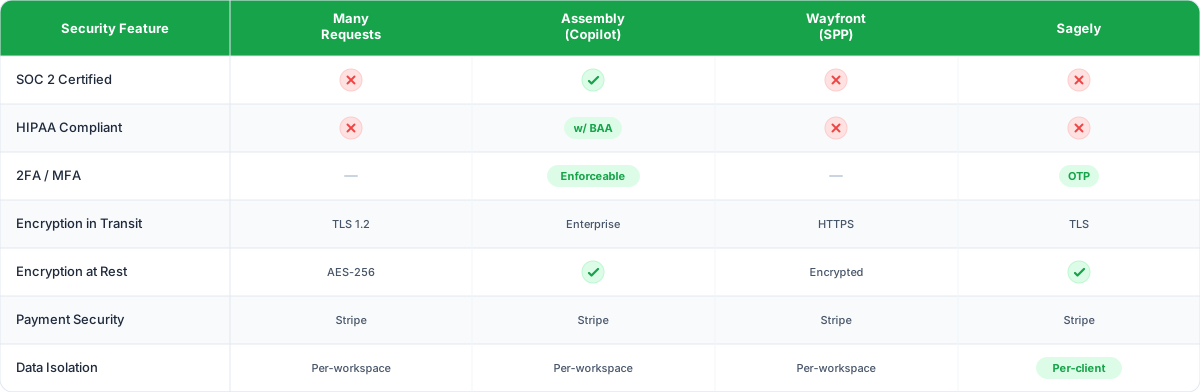
What stands out:
Common security gaps in consumer-grade tools
Tools like Google Drive, Notion, and Slack weren't built for multi-client data isolation. One wrong share link or permission setting can expose one client's data to another.
A lot of agencies cobble together portals from tools that weren't built for multi-client environments. Google Drive, Notion, Trello with shared boards, a Slack Connect channel. These tools are great at what they do. They are not great at client data isolation.
Common gaps:
- No per-client access controls.
One wrong share link and Client A can see Client B's strategy docs.
- Password-only authentication. No MFA, no OTP. One compromised password and everything is exposed.
- No audit trail. If something goes wrong, you can't trace what happened.
- Shared databases. If two clients are on the same Notion workspace with different pages, a permissions mistake is one click away.
- No encryption at rest. The file is protected while it travels to the server. Once it's there, it's just sitting unencrypted.
This doesn't mean you need to ditch these tools entirely. It means you should use a purpose-built portal for client-facing access and keep your internal tools internal.
Questions to ask when evaluating portal software
Before you commit to a portal tool, ask these directly. If the sales team can't answer them clearly, that's your answer.
- How is client data isolated? Is it at the database level, the application level, or both?
- What authentication methods do you support? Password-only, 2FA, or passwordless (OTP)?
- Are you SOC 2 certified? If not, what third-party audits have you completed?
- Where are your servers located? Can I choose a data region?
- Do you provide audit logs? What level of detail? How long are they retained?
- What happens to client data if I cancel? Is it deleted? How soon? Can I export first?
- Do you have a data processing agreement (DPA)? Required for GDPR compliance.
- How do you handle security incidents? What's your notification timeline?
- What encryption standards do you use? Both in transit and at rest.
- Can clients be restricted by IP? Relevant for clients with strict network policies.
Print this list. Bring it to every demo. You'll be surprised how many vendors stumble on question six.
Client data types and what they actually need
Not all data is created equal. Here's a quick breakdown of what you're likely handling in a portal and the security implications:
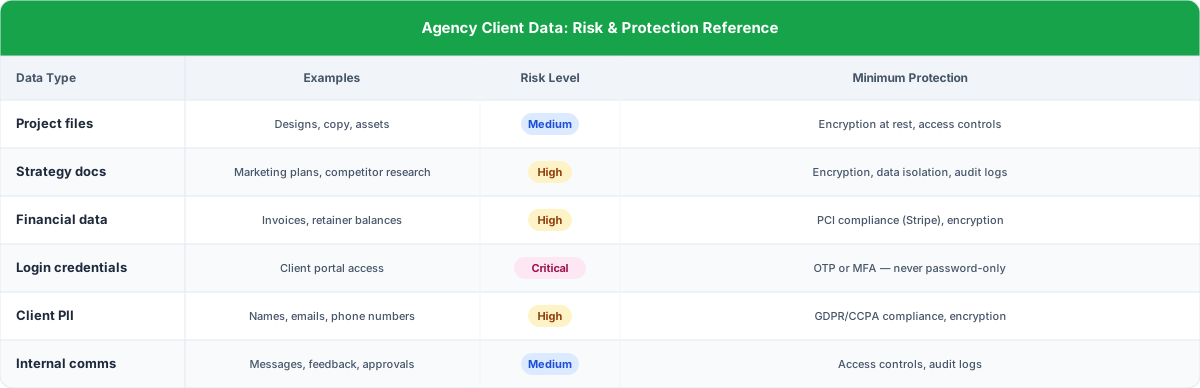
The takeaway: you're handling more sensitive data than you probably realize. Strategy docs contain competitive intelligence. Financial records are regulated. Even the emails in your portal messages are PII under GDPR.
Implementing secure workflows
Good security is process, not just software. Build access approvals, data retention policies, regular access reviews, and offboarding checklists into your standard operating procedures.
Security isn't just about picking the right tool. It's about how you use it. A few things worth building into your process:
Access approval process. When a new person from your client's team needs portal access, don't just add them. Have the primary client contact confirm it. Takes 30 seconds and prevents unauthorized access. Decide in advance how long you keep client data after a project ends. Document it. Tell your clients. "We retain project files for 90 days after project completion, then permanently delete them" is a sentence that builds trust and protects you. Your NDA with clients should cover digital data handling, not just verbal confidentiality. Specify how data is stored, who has access, and what happens to it when the engagement ends. Once a quarter, review who has access to each client's portal. Remove people who've left the team or the client's organization. Old accounts sitting around with active access are a common and preventable risk. When a client engagement ends, have a process: export any needed data, deactivate access, delete data per your retention policy. Don't leave dead accounts floating around for years. No, it's not required. But if you serve enterprise clients or clients in regulated industries (healthcare, finance, legal), they may require it. For most small to mid-size agencies, strong encryption, OTP authentication, and data isolation cover the practical security needs. SOC 2 is a trust signal, not a legal mandate for agencies. Password reuse and credential theft. Compromised credentials are the initial attack vector in 16% of data breaches (IBM, 2025). This is why OTP (passwordless) authentication is so effective. There's no persistent password to steal, reuse, or phish. If your portal still uses password-only login, that's the first thing to change. Yes, if you have clients in the EU or handle data belonging to EU residents. GDPR applies to the data subject's location, not yours. If your client's customers include EU residents and that data touches your portal, you're on the hook. Keep it simple: "Your data is encrypted, your login doesn't use a password (so there's nothing to steal), and only people you authorize can see your information." Most clients don't want a technical deep-dive. They want to know you've thought about it. Contact your portal vendor immediately. Check audit logs for unusual access patterns. Notify affected clients within 72 hours (required under GDPR, good practice everywhere). Document everything with timestamps. Then conduct a review of how it happened, what data was affected, and what changes will prevent a repeat. Building a client portal? Start with the complete guide to client portals for agencies, or compare your options in our agency portal software comparison.Data retention policy.
NDA coverage.
Regular access reviews.
Offboarding checklist.
FAQ: Client portal security for agencies
Is SOC 2 compliance required for agency client portals?
What's the most common security vulnerability in client portals?
Do I need to worry about GDPR if I'm a US-based agency?
How do I explain portal security to clients who aren't technical?
What should I do if I suspect a security breach in my portal?