


Does Your Client Portal Support Payment Processing & Invoicing?
Last updated: March 2026
Nobody starts an agency thinking "I can't wait to chase invoices." But here you are, three years in, spending Friday afternoons pinging clients about overdue payments while your actual work piles up.
I've been there. One month I had four outstanding invoices, two of which were from the same client who swore they'd "sent it last week." They hadn't. And the worst part? I couldn't even prove exactly what they owed because my retainer tracking lived in a spreadsheet I hadn't updated since the 12th.
Client portal payment processing lets agencies handle invoicing, retainer tracking, and payment collection inside the same platform where clients check project status and files, reducing billing disputes through real-time usage visibility and giving clients one-click access to invoices and balances.
Here's the reality: how you handle money inside your client portal determines whether billing is a non-event or a recurring source of friction. And most agencies pick a portal without ever looking at how it handles payments. Then they bolt on Stripe, duct-tape an invoicing tool on top, and wonder why clients still dispute charges.
Let's talk about what payment processing in agency client portals actually looks like, which platforms do it well, and where the gaps are. For the full picture on choosing a portal, see our complete guide to client portals for agencies.
Why payment processing in your portal actually matters
Payment processing inside your portal matters because it kills billing disputes through transparency, speeds up cash flow with fewer steps between work and payment, and recovers the 20-30% of billable time that goes untracked with manual methods.
You might think billing is a back-office problem. Something you deal with in QuickBooks or FreshBooks, separate from client-facing work. But there are three reasons that thinking gets agencies in trouble.
Transparency kills disputes. When a client can log into their portal and see every invoice, every retainer balance, and every hour tracked against their account, the "I didn't know about that charge" conversation disappears. I've had clients dispute $2,000 invoices over scope they forgot they approved. If that approval and the usage tracking lived in the same portal they check every week, we would have caught it at hour 15, not hour 40.
Faster cash flow. The more steps between "work is done" and "you get paid," the longer you wait. If your client has to receive an email, open a PDF, find their credit card, and go to a separate payment page, you've just built four opportunities for procrastination. Pay links inside a portal they already visit? That's one click.
Your admin time has a cost. Studies show 20 to 30 percent of billable time goes untracked with manual billing methods. Lost revenue is one thing, but unbilled time is worse — you'll never recover hours nobody wrote down. When time tracking connects directly to invoicing inside your portal, that leak shrinks dramatically.
What clients should see in their portal
Here's what I think the baseline should be for payment visibility in any client portal. Not "nice to have." Baseline.
Invoice history. Every invoice you've ever sent, with status (paid, pending, overdue). Clients shouldn't have to dig through their email to find an invoice from four months ago. If your portal doesn't show this, you're going to get asked for it.
Current retainer balance. If you run retainers (and most agencies reading this do), the client should see their remaining hours or budget in real time. Not at the end of the month when you send a report. Right now. Today. "You've used 28 of 40 hours this month" is the kind of transparency that makes billing conversations boring. And boring is exactly what you want.
Upcoming charges. Subscription renewals, retainer charges, upcoming milestone invoices. No surprises. Clients hate surprises on their credit card statement. A simple "your $3,500 retainer renews on March 15" inside the portal sets the expectation before the charge hits.
Payment method on file. Let clients update their own card. This sounds minor until a card expires and you spend two weeks chasing a new one while work stalls.
Retainer tracking: where most portals fall short
Most portals track retainer payments but not retainer usage, leaving agencies without visibility into hours consumed, overage handling, or month-end reporting that clients need to feel confident about the value they're getting.
Retainer tracking is where the real money problems live. And it's where most client portals either have nothing or do the bare minimum.
Here's the thing: there's a difference between tracking retainer payments and tracking retainer usage. Most tools handle the first one. Very few handle the second.
Balance vs. usage tracking. Tracking that a client paid $5,000 this month is accounting. Tracking that they've used 32 of 40 hours, with a breakdown by project and task, is operational transparency. The second one is what prevents the "I feel like I'm not getting my money's worth" conversation that every retainer agency has had at least once.
Overage handling matters more than you think. What happens when a client hits their retainer cap mid-month? Do you stop work? Bill the overage at a premium? Roll it into next month? If your portal doesn't have a system for this, you're handling it manually, which means inconsistently. Different account managers make different calls. Clients on the same plan get treated differently. That's how you end up in a billing dispute at renewal time.
Sagely handles this with three distinct overage models built in: you can pause work, bill overages automatically, or roll unused hours forward. That's not a small thing. It means the rules are set once, applied consistently, and visible to the client. No awkward conversations. No surprises.
ManyRequests takes a different approach with hours rollover and discount codes, which works well for creative subscription models. But if you're running traditional retainers with variable scope, the rollover model can actually obscure usage over time.
Month-end reporting. At minimum, your portal should generate (or let you easily export) a monthly retainer usage report. Clients who see detailed breakdowns of how their hours were spent are far less likely to question value. I've had clients renew retainers for years without negotiating price because they could see exactly what they were getting.
Platform comparison: who does payment processing well?
Here's an honest comparison of how six client portal platforms handle payment processing and invoicing:
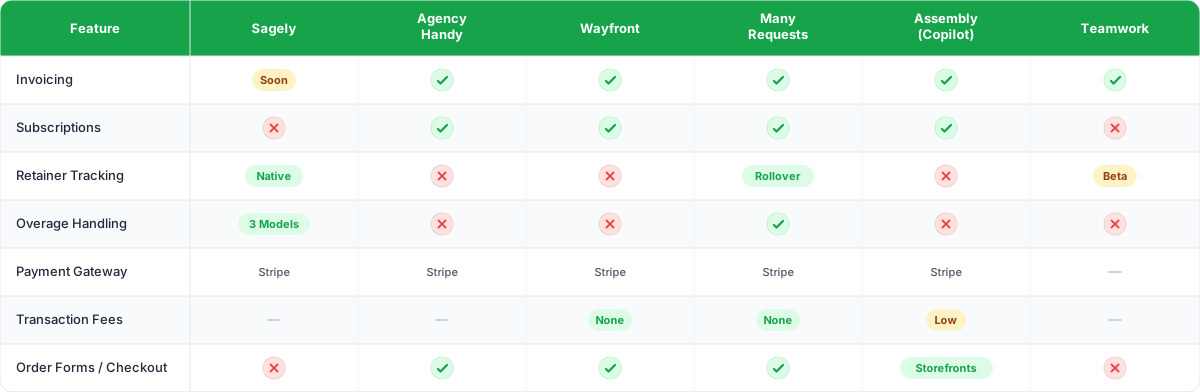
A few things stand out here.
Most platforms use Stripe. That's fine. Stripe is reliable and clients trust it. But the integration depth varies wildly. Wayfront's Stripe checkout is tightly integrated with their order form workflow, zero transaction fees included. Agency Handy bolts Stripe onto their invoicing. Same payment gateway, very different experience.
Retainer tracking is rare. Only Sagely and ManyRequests have real retainer tracking built in. Teamwork has it in beta. The rest either don't offer it or expect you to track retainers in a separate tool. If you run retainers, this alone should narrow your shortlist to two or three options.
Overage handling is even rarer. Sagely and ManyRequests are the only two with structured overage models. Everyone else leaves it to you to figure out manually. For a five-person agency with three retainer clients, that's manageable. For a fifteen-person agency with twenty retainer clients, manual overage tracking is a full-time job nobody signed up for.
Where the gaps are
Sagely is honest about its gap here. Invoicing isn't live yet (it's coming). So right now, you'd pair Sagely's retainer tracking with a separate invoicing tool. That's a real tradeoff. You get the best retainer management on this list, but you're sending invoices from somewhere else until invoicing launches. For retainer-heavy agencies where usage tracking matters more than the invoice itself, that tradeoff makes sense. For agencies that need invoicing as the core workflow, it doesn't.
Agency Handy and Wayfront have invoicing and checkout but no retainer tracking. If your business model is productized services, order forms, and one-off projects, both work well. If you run retainers, you're back to spreadsheets for usage tracking.
Teamwork has time tracking and project budgets that beat everyone else on this list, but invoicing is an add-on and retainer tracking is still in beta. It's a project management tool that's slowly adding billing features, not a billing tool.
Assembly has invoicing, pay links, and storefronts, which is solid for professional services. But no retainer tracking means it's better suited for project-based billing than ongoing retainer relationships.
How invoicing in portals reduces billing disputes
Let's get specific about this, because it's the real business case for putting payments inside your portal instead of handling them separately.
Dispute pattern #1: "I didn't approve that." When approvals and invoices live in the same system, the paper trail is automatic. Client approved a scope addition on March 3. That scope addition shows up as a line item on the March 15 invoice. The client clicks the invoice, sees the approval tied to it, and pays. No dispute.
Dispute pattern #2: "That seems high." This happens when clients see a dollar amount disconnected from the work. A $7,000 invoice with no context feels like a lot. A $7,000 invoice linked to a retainer dashboard showing 45 hours of work across four projects, with deliverables attached, feels fair. Context converts skepticism to acceptance.
Dispute pattern #3: "I forgot about that recurring charge." Subscription and retainer charges that surprise clients erode trust. Even if the client agreed to monthly billing six months ago, a charge they forgot about feels aggressive. Portal visibility (upcoming charges, renewal dates, retainer terms) prevents the surprise entirely.
If you're dealing with any of these regularly, read our full breakdown on how to prevent billing disputes at your agency.
What to look for before you choose
Before you pick a portal based on payment features, ask yourself three questions:
Is your business model retainer-based or project-based? Retainer agencies need usage tracking and overage handling. Project-based agencies need invoicing and checkout flows. Don't buy a tool optimized for the wrong model.
How much billing admin are you doing manually right now? If you're spending more than two hours a week on invoicing, payment follow-ups, and retainer reporting, you need automation in your portal. If billing is already smooth and you just want client visibility, a simpler integration works.
Do your clients actually log into their portal? Payment features only matter if clients use the portal. This is where login friction becomes a billing problem. A portal with passwordless access (like Sagely's OTP login) gets higher adoption, which means clients actually see their invoices and retainer balances. A portal nobody logs into is just a dashboard for you.
For a broader look at how these tools compare across all features (not just payments), see our full client portal software comparison.
FAQ
Can I use my existing invoicing tool with a client portal?
Yes. Most portals integrate with Stripe, and you can run invoicing through QuickBooks, FreshBooks, or Xero alongside your portal. The tradeoff is that clients won't see invoice history inside the portal itself, which means you lose the transparency benefits.
What's the difference between retainer tracking and invoicing?
Invoicing is sending a bill. Retainer tracking is showing the client how their hours or budget are being used in real time. You need both for retainer-based agencies. Invoicing without retainer tracking leads to "why is this so much?" conversations. Retainer tracking without invoicing means clients still pay through a separate system.
Do agency client portals charge transaction fees on payments?
It depends on the platform. Wayfront and ManyRequests charge zero transaction fees (beyond Stripe's standard processing fees). Assembly charges low fees. Most others pass through Stripe's standard 2.9% + $0.30 per transaction. Always check whether the portal adds fees on top of the payment gateway's fees.
How does retainer overage handling work in client portals?
Most portals don't handle overages at all. Sagely offers three models: pause work at the cap, bill overages automatically at a set rate, or roll unused hours into the next period. ManyRequests supports hours rollover. For everyone else, you're managing overages manually through separate conversations and invoices.